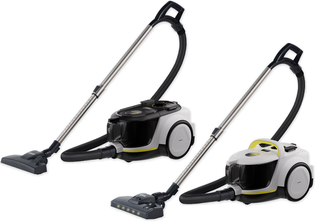
VCC 4 CycloneX BW VCC 6 CycloneX DualControl BW VCC 6 CycloneX DualControl VCC 6 CycloneX DualControl BW
59803940 (07/25)
59803940 (07/25)
 Read these safety instructions and the original instructions before using the device for the first time. Act in accordance with them. Keep the two booklets for future reference or for future owners.
In addition to the notes in the operating instructions, you also need to take into consideration the general safety regulations and accident prevention guidelines applicable by law.
Warnings and information notices attached to the device provide important information for hazard-free operation.
Indication of an imminent threat of danger that will lead to severe injuries or even death.
Indication of a potentially dangerous situation that may lead to severe injuries or even death.
Indication of a potentially dangerous situation that may lead to minor injuries.
Indication of a potentially dangerous situation that may lead to damage to property.
Risk of asphyxiation. Keep packaging film out of the reach of children.
Only use the device for its proper use. Take into account the local conditions and beware of third parties, in particular children, when working with the device.
Persons with reduced physical, sensory or mental capabilities and persons lacking experience and knowledge may only use the appliance if they are properly supervised, have been instructed on use of the appliance safely by a person responsible for their safety, and understand the resultant hazards involved.
Only people who have been instructed on how to use the device, or have proven their ability to operate it, and have been explicitly instructed to use it, must use the device.
Children must not operate the device.
Children from the minimum age of 8 may use the appliance if they are properly supervised or have been instructed in its use by a person responsible for their safety, and if they have understood the resultant hazards involved.
Children must be supervised to prevent them from playing with the appliance.
Children may only perform cleaning work and user maintenance under supervision.
Safety devices are provided for your own protection. Never modify or bypass safety devices.
Only connect the device to alternating current. The voltage indicated on the type plate must match the voltage of the power source.
Never touch the mains plug and socket with wet hands.
Only operate the device via a fault current protection switch (maximum 30 mA).
Do not immerse the device in water.
Only connect the device to an electrical connection which has been set up by a qualified electrician as per IEC 60364‑1.
Check the power supply cable with mains plug for damage before operation each time. Do not put the device into operation with a damaged power supply cable. Have a damaged power supply cable replaced immediately by the authorised customer service / qualified electrician.
Do not damage the power supply and extension cable by running over it, crushing or yanking it or similar. Protect the power supply cable from heat, oil and sharp edges.
In case of longer breaks in operation and after use, switch off the device at the main switch / device switch and pull the mains plug.
Switch off the device and unplug the mains plug before performing cleaning/maintenance.
When using the device, pull the power supply cable fully out of the device. If the cable is wrapped around the cable hook, you must undo it completely.
Do not carry/transport the device using the power supply cable.
Do not pull the mains plug out the socket using the power supply cable.
In case of any foam formation or escaping liquids, switch off the device immediately and remove the mains plug.
Operation in explosive atmospheres is prohibited.
Risk of explosion
Never use the device to vacuum up combustible gases, liquids or dusts.
Never use the device to vacuum up reactive metal dusts (e.g. aluminium, magnesium, zinc).
Never use the device to vacuum up undiluted brine or acids.
Never use the device to vacuum up any burning or smouldering objects/matter.
These substances can corrode the materials in use on the device.
Risk of injury. Do not use the nozzle and suction pipe at head height.
Never leave the device unsupervised while it is in operation.
Accidents or damage due to the device falling over. Before all actions with or on the device, you must make sure that it is stable.
Protect the device from extreme weather conditions, moisture and heat.
Never use the device without a filter, this can lead to device damage.
Switch off the device immediately and remove the mains plug before performing any care and service work.
Have repair work and work on electrical components carried out by the authorised customer service only.
Do not use scouring agents, glass or multi-purpose cleaner for cleaning.
In order to prevent accidents or injuries, you must observe the weight of the device when transporting it.
Only use the device in private households.
The device is intended exclusively for cleaning dry surfaces
The following are not in accordance with the intended use:
Cleaning people, animals, plants or clothing on the body.
Soaking up water or other fluids.
Extraction of glowing ashes, coal, cigarettes or other flammable or easily inflammable substances.
Use in the vicinity of explosive or highly flammable substances.
 The packing materials can be recycled. Please dispose of packaging in accordance with the environmental regulations.
 Electrical and electronic devices contain valuable, recyclable materials and often components such as batteries, rechargeable batteries or oil, which - if handled or disposed of incorrectly - can pose a potential danger to human health and the environment. However, these components are required for the correct operation of the device. Devices marked by this symbol are not allowed to be disposed of together with the household rubbish.
Current information on content materials can be found at: www.kaercher.com/tr/
Only use original accessories and original spare parts. They ensure that the appliance will run fault-free and safely.
Information on accessories and spare parts can be found at www.kaercher.com/tr/
The warranty conditions issued by our relevant sales company apply in all countries. We shall remedy possible malfunctions on your appliance within the warranty period free of cost, provided that a material or manufacturing flaw is the cause. In a warranty case, please contact your dealer (with the purchase receipt) or the next authorised customer service site.
Further information can be found at: www.kaercher.com/dealersearch
Further warranty information (if available) can be found in the service area of your local Kärcher website under "Downloads".
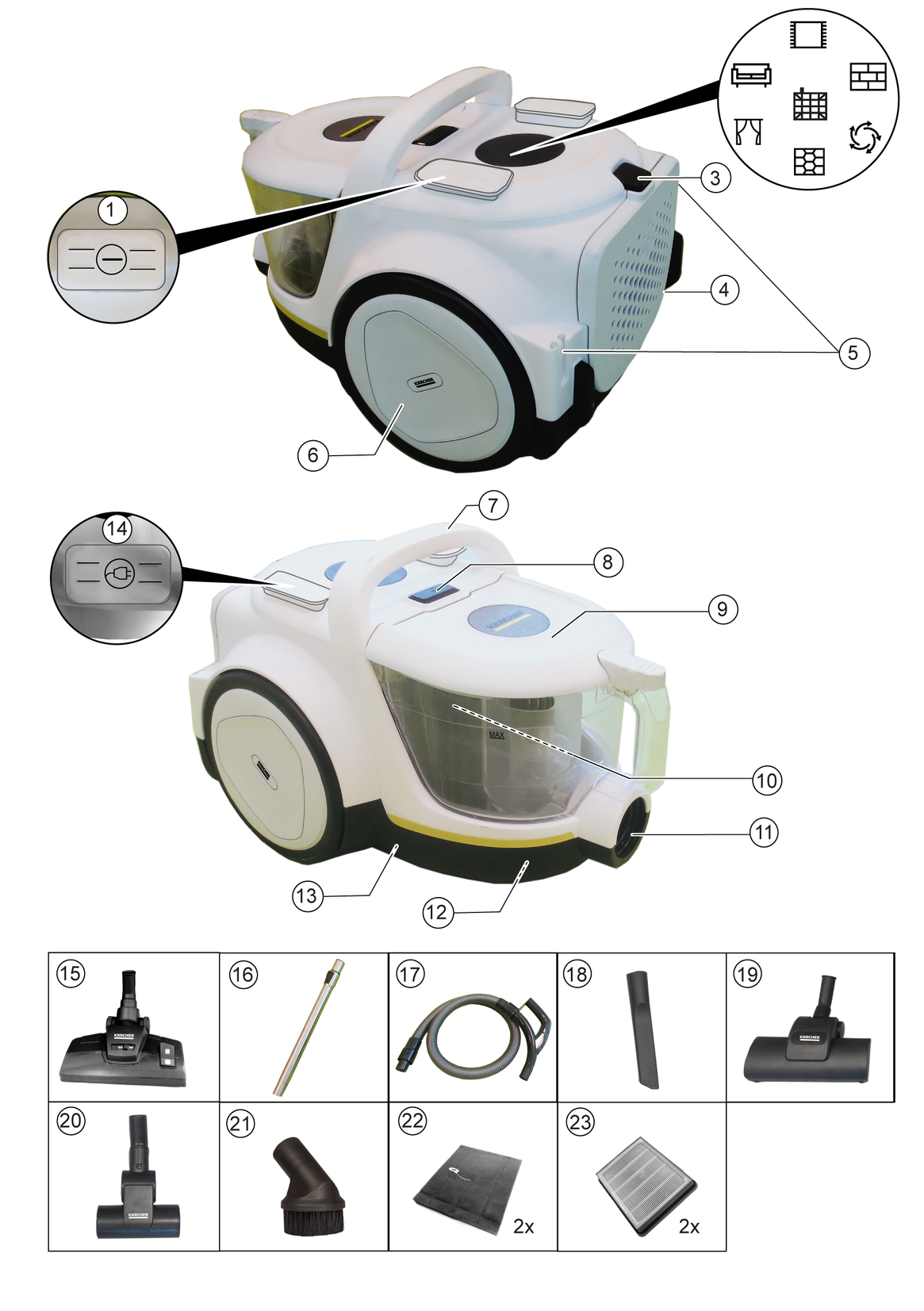
The scope of delivery for the appliance is shown on the packaging. Check the contents for completeness when unpacking. If any accessories are missing or in the event of any shipping damage, please notify your dealer.
There are two variants of the VCC devices: VCC 4 and VCC 6 - see cover picture.
The illustrations show the VCC 6 device models and describe all possible equipment options. The device is equipped with different equipment depending on the model selected. The specific equipment is described on the device packaging.
* EN 1822:1998
** depending on different configurations
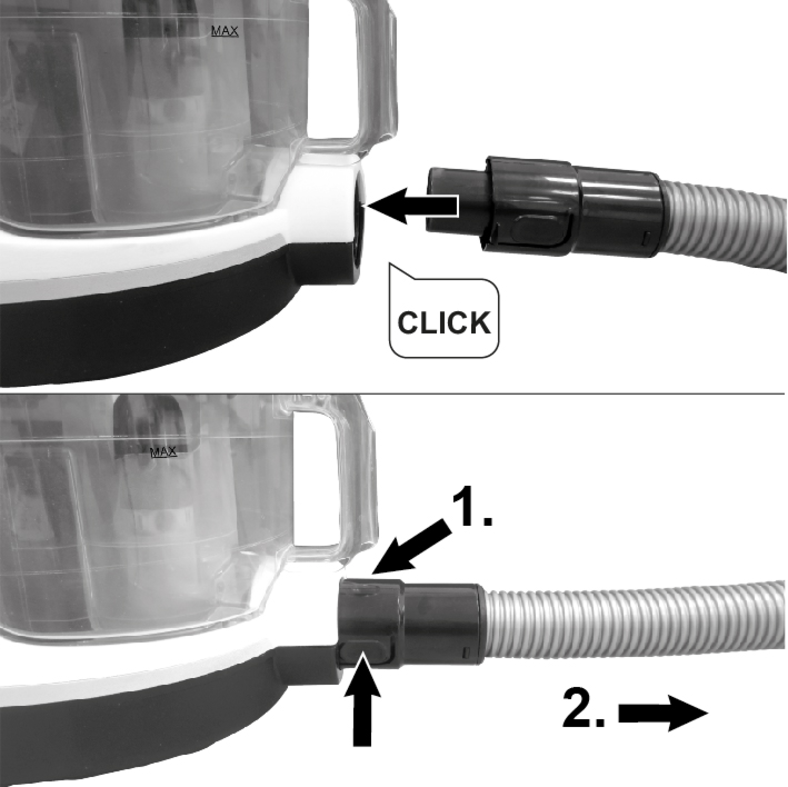
Attach the suction hose to the connection on the device, until it audibly engages.
To remove, press the latch together and pull off the suction hose.
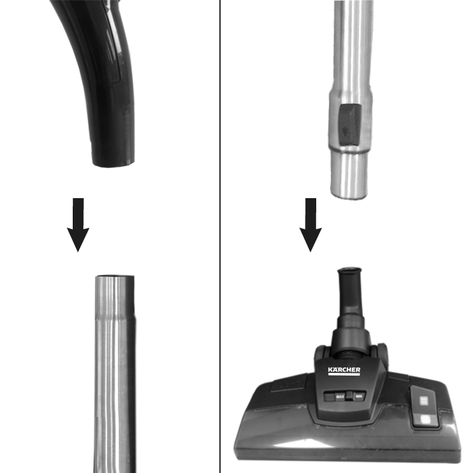
Push the handle of the suction hose and telescopic suction pipe together and snap into place.
Plug the floor nozzle and telescopic suction pipe together and snap into place.
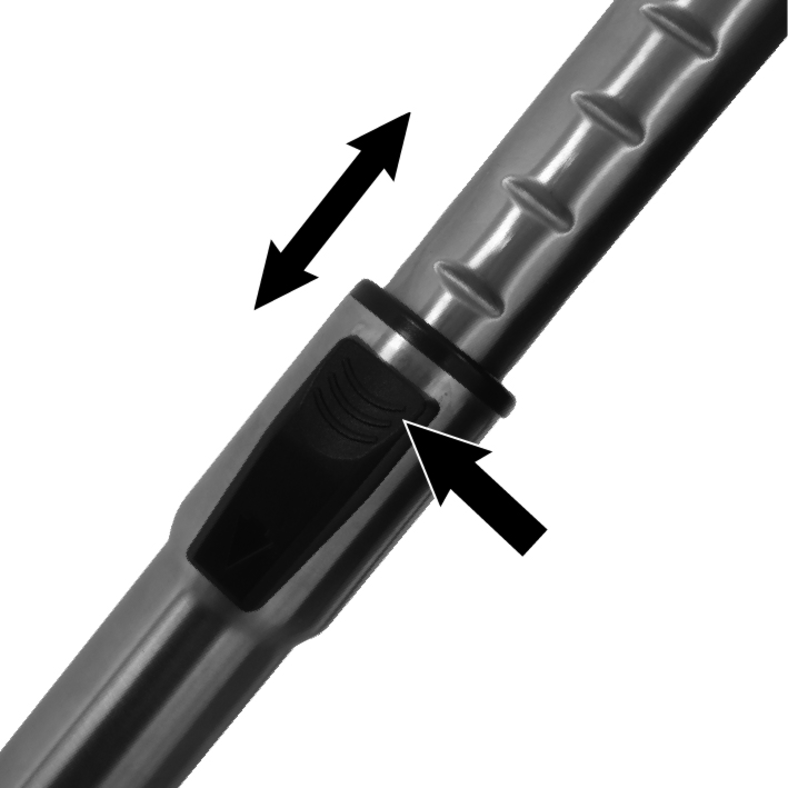
Operate the adjustment of the telescopic suction pipe and set the telescopic suction pipe to the desired length.
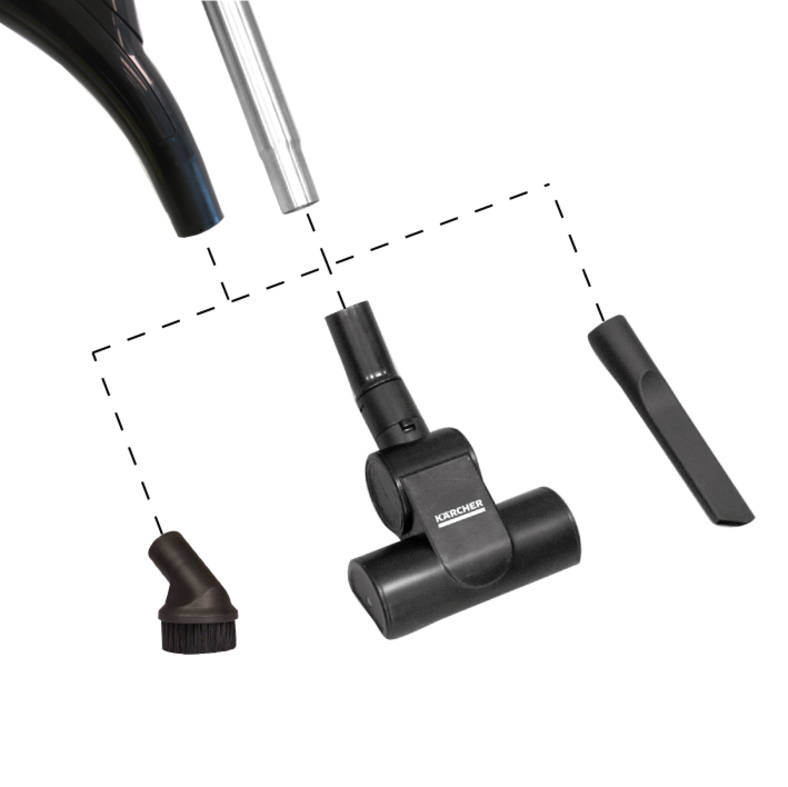
Accessories, such as crevice nozzles, can be attached to the handle of the suction hose or to the telescopic suction pipe to increase the reach.
To change or disconnect the accessory, remove the accessory (e.g. crevice nozzle or floor nozzle) from the handle or telescopic suction pipe.
For the floor nozzle with LED lighting and the handle with a suction power regulator function, 2 batteries (AAA / LR03) must be inserted correctly before initial startup. See chapter Change batteries
Grip the plug firmly and pull to disconnect the mains cable.
Plug the mains plug into the socket.
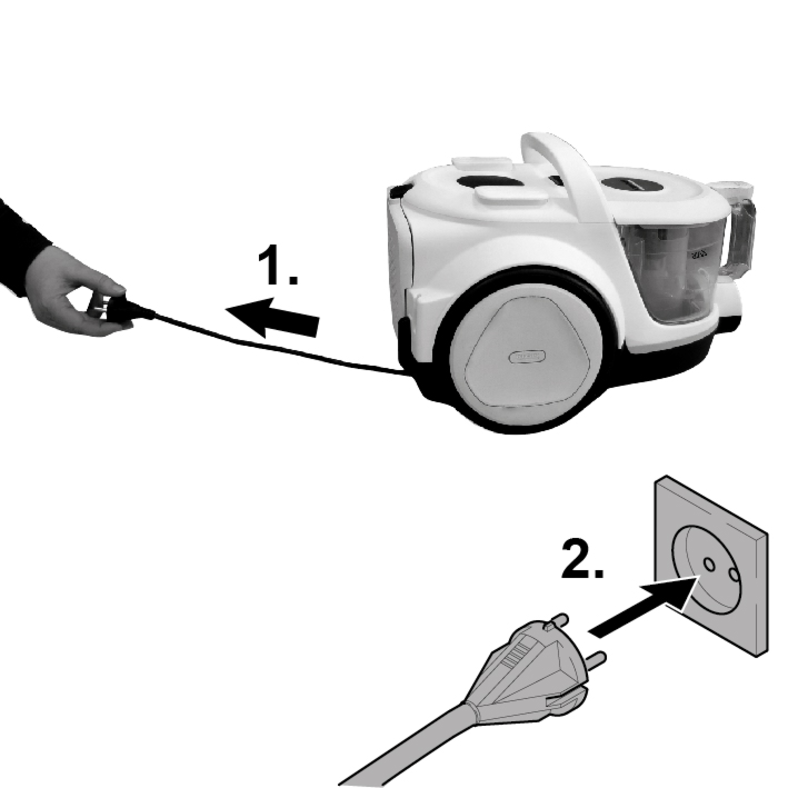
To change accessories, see chapter Installing accessories
Install the desired accessory, see chapter Installing accessories.
Switch on the device by pressing the on/off button on the device or on the handle.
Adjust the suction power as needed.
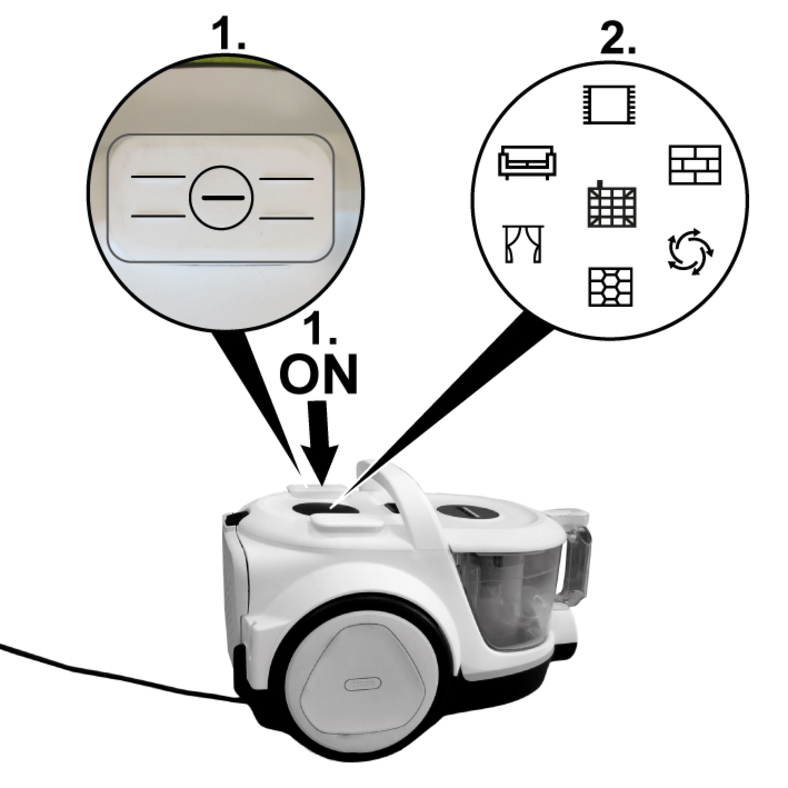
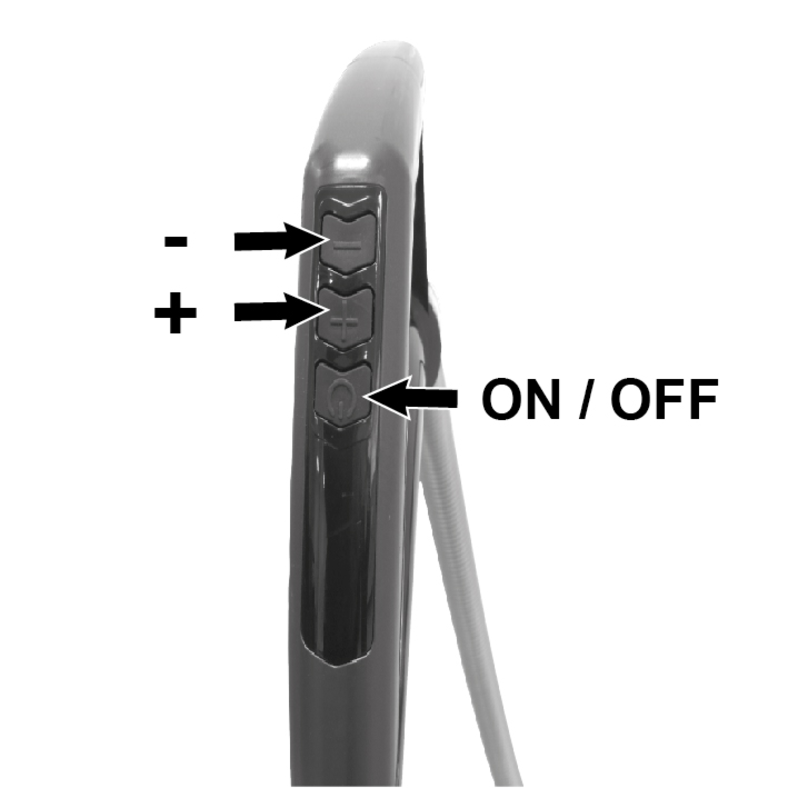
Depending on the device variant, the device is equipped with a control knob or a display to adjust the suction power.
Devices with control knob: Set the desired suction power by turning it to the symbol.
Devices with display: Set the desired suction power using the + / - buttons on the handle.
The batteries must be inserted, and the on/off button pressed to switch the device on.
The suction power setting is indicated by the respective symbol lighting up.
Symbol | Suction power adjustment for: |
|---|---|
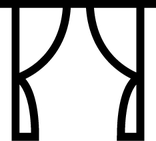 | Curtains and delicate textiles. |
 | Delicate upholstered furniture and cushions. |
 | Delicate carpets and daily cleaning for light soiling. |
 | Robust floor coverings (e.g. laminate, vinyl). |
 | Hard floors and heavily soiled carpets and rugs. |
NoteDevices with a display also have a symbol for the motor protection filter and HEPA filter indicator, which light up red as soon as action is required. | |
Symbol | Need for action for: |
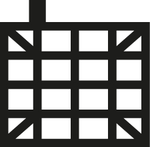 | Cleaning the motor protection filter / replacing the motor protection filter, see chapterCleaning the motor protection filter |
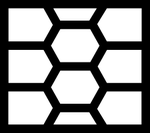 | HEPA filter must be replaced with a new one, see chapterReplacing the HEPA filter |
Empty the dust container at the latest when the “MAX” marking is reached.
Press the latch on the suction hose together and pull the suction hose off the device.
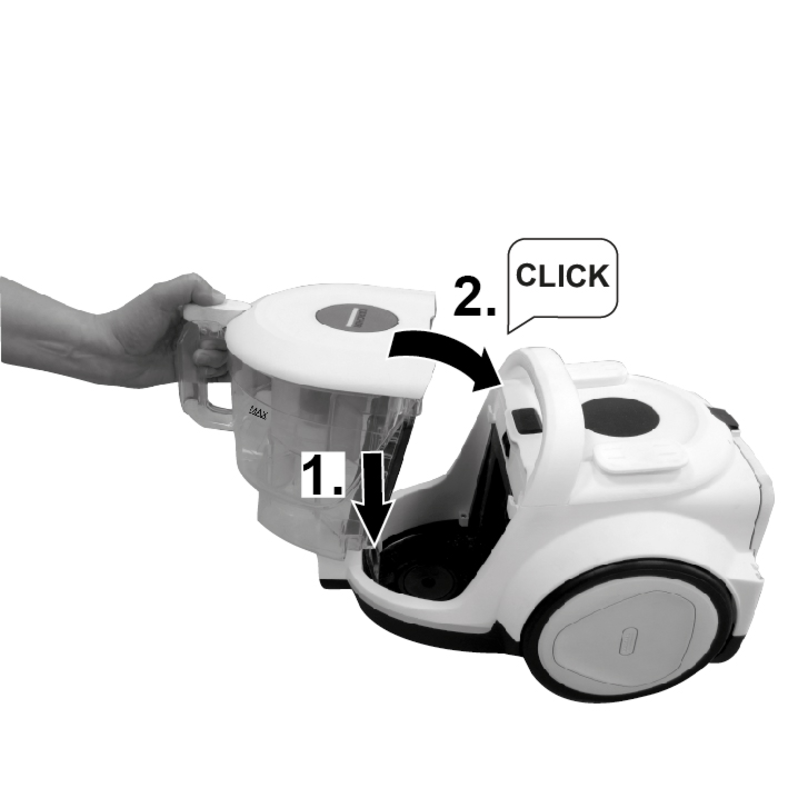
Press the release button for the dust container and remove the container from the device using the handle.
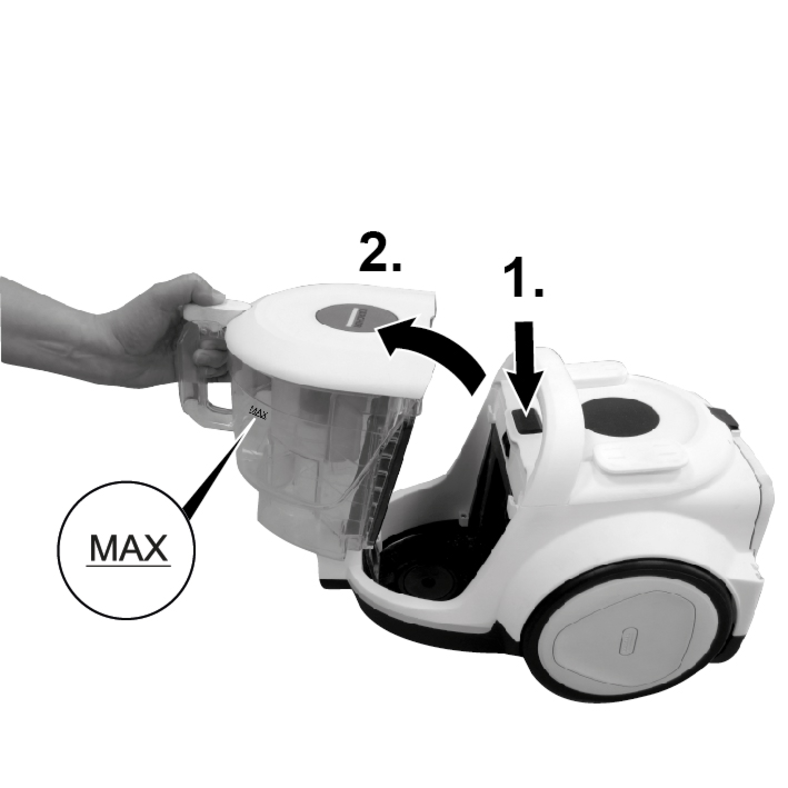
Open the dust container cover with your thumb and empty the contents over a waste bin.
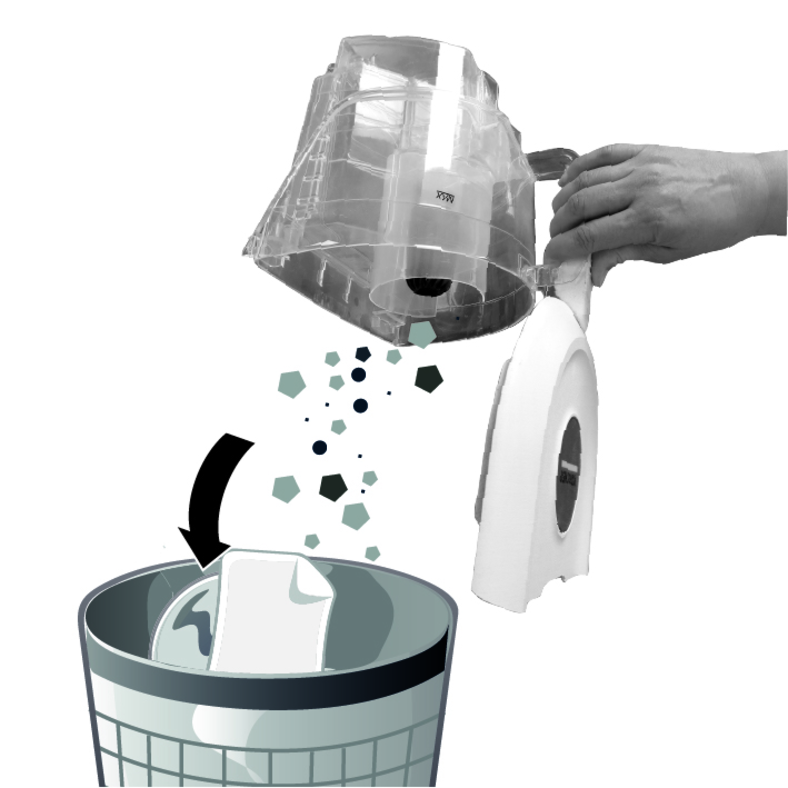
Close the dust container cover, place the dust container in the device and engage.
Ensure that the dust container is seated correctly when inserting.
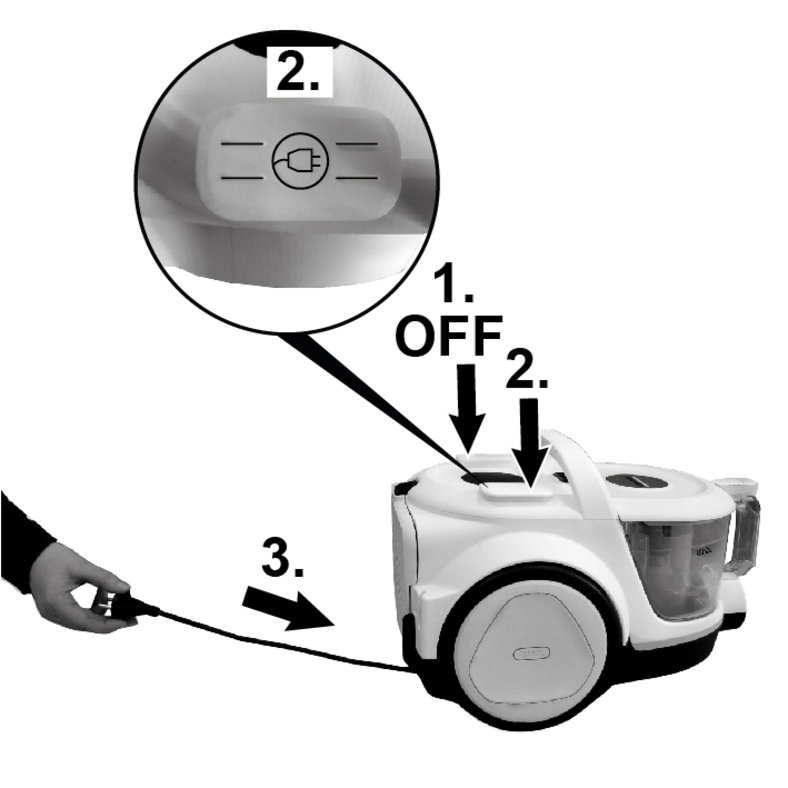
Switch off the device by pressing the on/off button.
Press the cable storage button or pull the mains cable towards you briefly.
The mains cable retracts automatically.
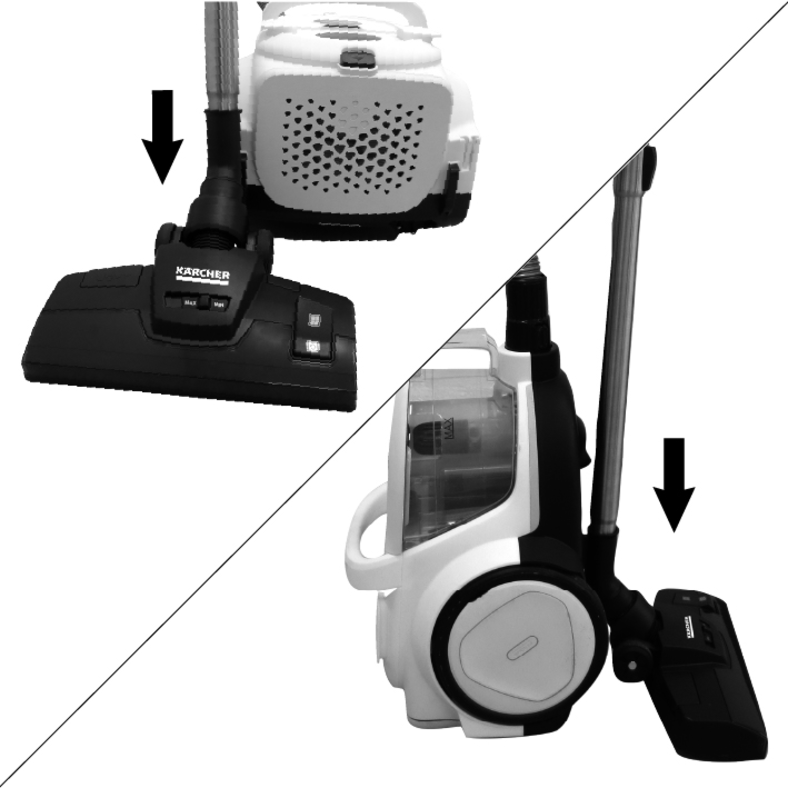
For storing the device:
Hook the floor nozzle into one of the two parking brackets on the back of the device and press it into the grid position.
or
Set up the device and hook the floor nozzle into the parking brackets on the underside of the device and press it into the grid position.
Store the device in a dry and frost-proof room.
To prevent the batteries from leaking, remove the batteries from the floor nozzle with LED lighting and the handle with suction power adjustment when not in use for a longer period of time.
Which accessories are included in the scope of delivery is shown on the device packaging.
Accessories not included in the packaging can be purchased in a KÄRCHER specialist shop or from www.kaercher.com/tr/
Test the accessory at an inconspicuous point before using it in a sensitive area.
Follow the manufacturer's cleaning instructions.
Attach accessories to the handle as required or to the telescopic suction pipe to increase the reach.
Switch setting symbol for carpet:
Carpets and rugs.
Switch setting symbol for parquet:
Hard surfaces (e.g. tiles, laminate)
The "MIN" and "MAX" controls in the centre of the floor nozzle can be used to adjust the strength of the brush depending on the type of carpet.
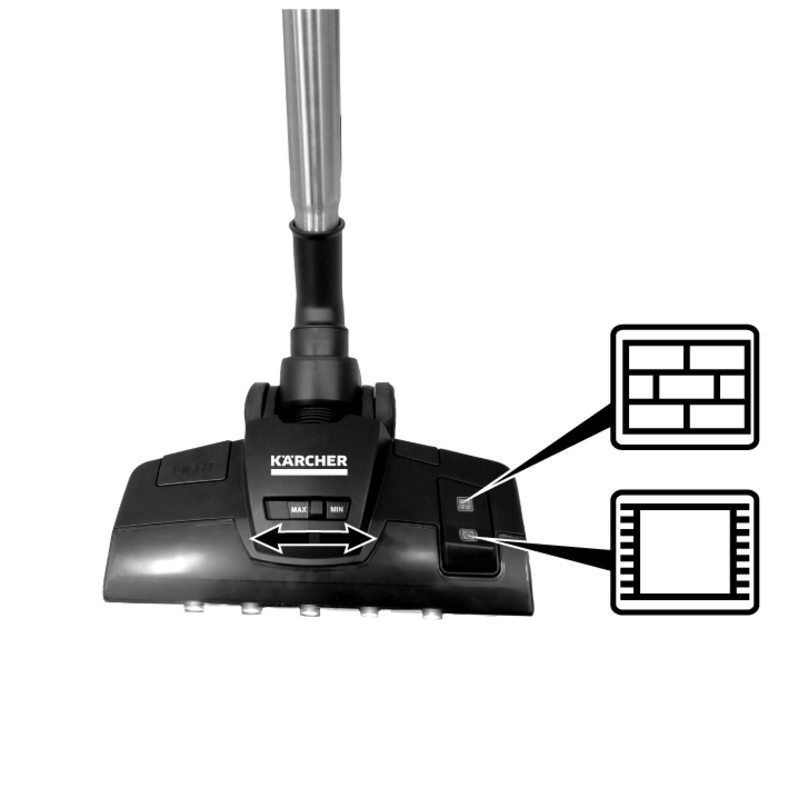
To switch on the LED lighting, press the button on the side.
The lights make fine dust visible on dark floors.
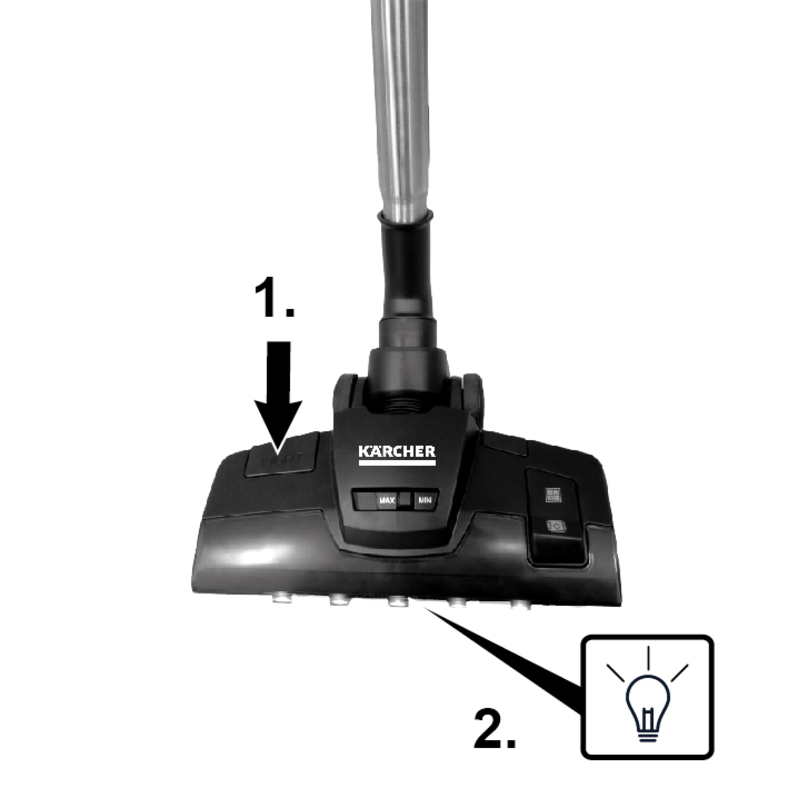
To use the LED lights, 2 fully charged batteries must be inserted in the floor nozzle, see chapter Change batteries
Switch setting symbol for carpet:
Carpets and rugs.
Switch setting symbol for parquet:
Hard surfaces (e.g. tiles, laminate).
The turbo nozzle has rotating bristles that help to pick up dirt from the carpet/rug or pet hair from the floor.
Two small wheels on the outer edge and two larger ones on the inner edge make it easy to roll over the carpet.
The higher the suction power setting, the faster and more effective the turbo brush is, see chapterVacuuming / adjusting the suction power
For edges, joints, heaters and areas that are difficult to reach.
For cleaning textile surfaces such as sofas, armchairs, mattresses, car seats, etc.
Removes dust and dirt gently and effectively from upholstered furniture and fabric covers and can also be used to clean furniture.
Ensures efficient removal of pet hair and dust particles from upholstered furniture, mattresses or other soft surfaces. The rotating round brush picks up even the finest hairs.
Clean the device and plastic accessory parts with a commonly available plastic cleaner.
If the dust container is visibly dirty, wipe it out with a damp cloth and insert it completely dry into the device, see chapterEmptying the dust container
For optimum suction performance, the motor protection filter must be cleaned regularly and replaced every 12 months.
If the symbol for the motor protection filter lights up red on device with a display, the filter must be replaced.
Remove the dust container from the device, see chapterEmptying the dust container
Use your thumb and index finger to pull the filter frame of the motor protection filter forwards by the two retaining devices and remove it from the dust container.
Reach into the recesses in the filter frame cover with your thumb and index finger and remove.
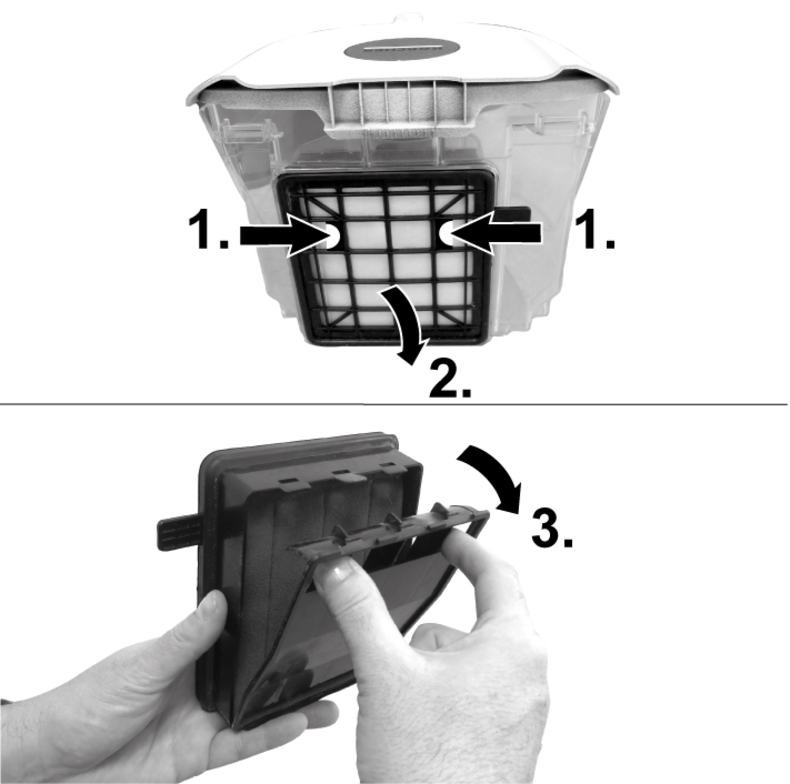
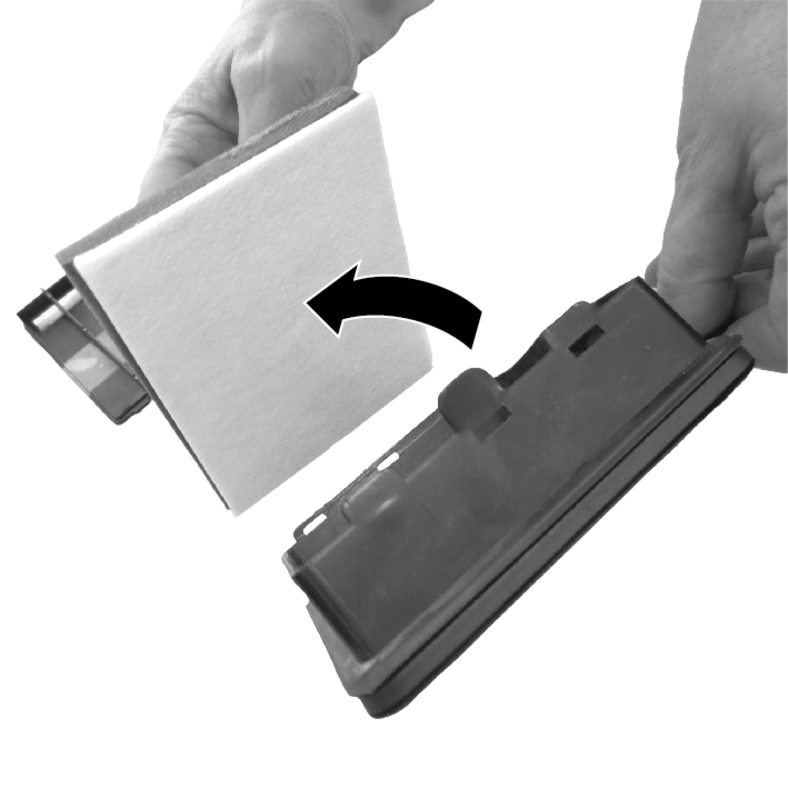
Pull out the motor protection filter by the loop.
Clean the motor protection filter under running water. Do not rub, do not brush off.
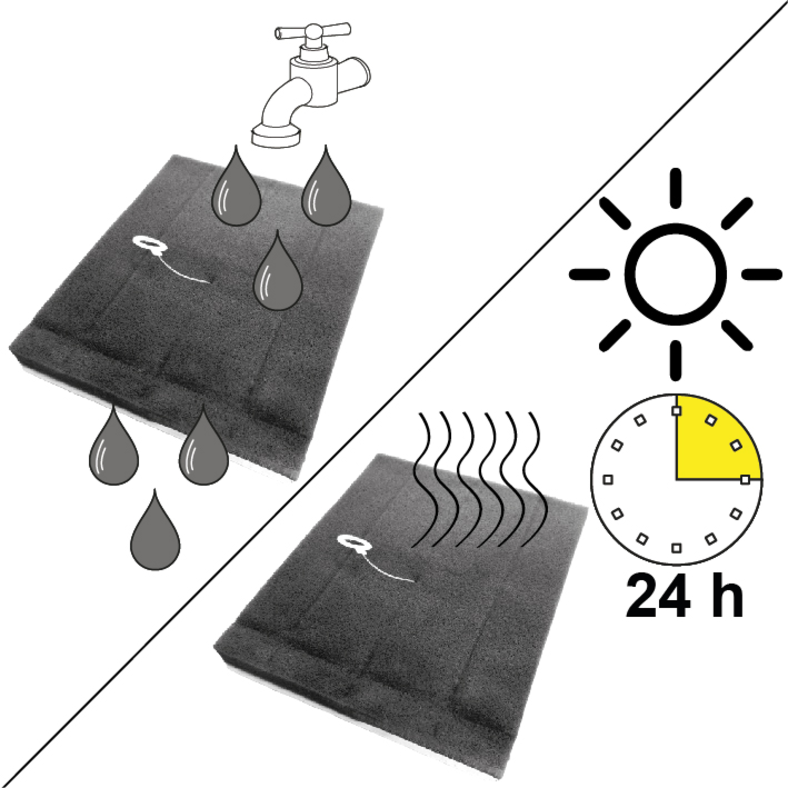
Device damage
A motor protection filter that is not completely dry can damage the device.
Make sure that the motor protection filter is completely dry on installation.Place the completely dry motor protection filter in the filter frame, with the white felt facing forwards (towards the filter frame grille).
Close the cover of the filter frame, making sure it is firmly seated.
Insert the filter frame into the dust container, making sure it is firmly seated.
The HEPA filter ensures clean exhaust air.
Replace the HEPA filter if there is visible damage/contamination or every 12 months.
If the symbol for the HEPA filter lights up red on device with a display, the filter must be replaced.
Press the unlocking button on the HEPA filter cover.
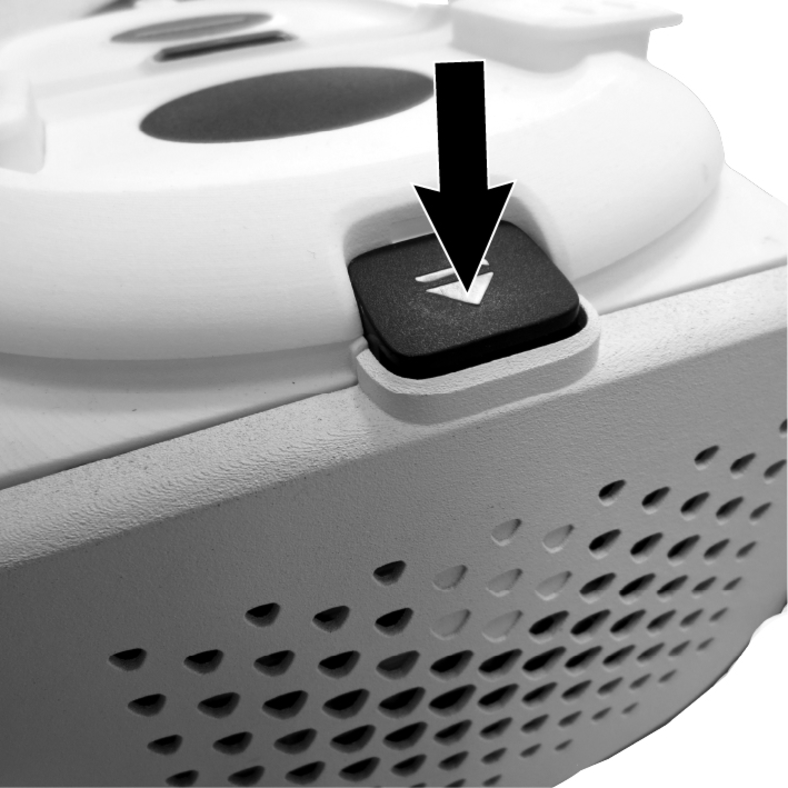
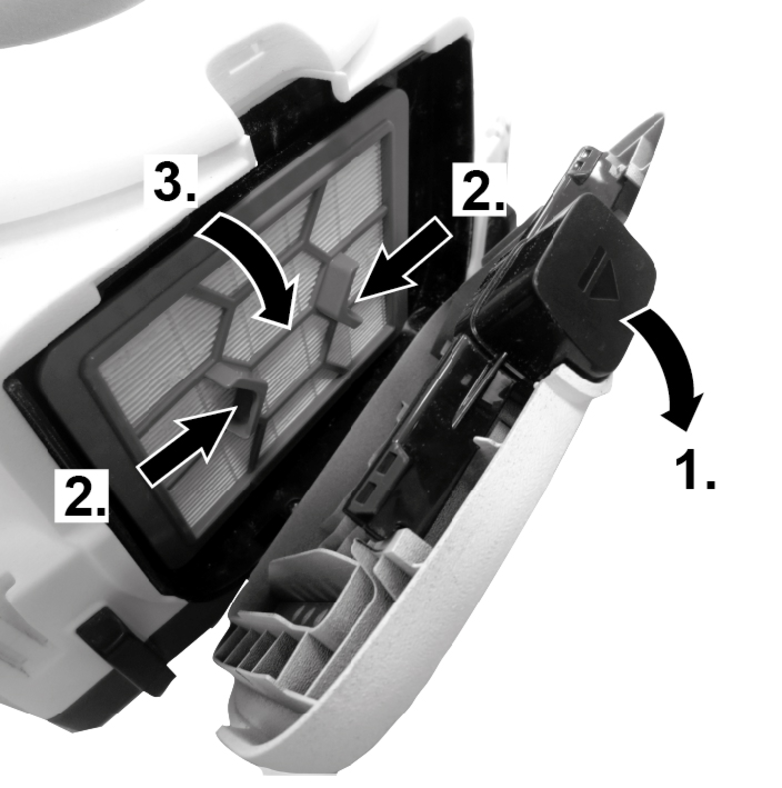
Remove the filter cover and take out the HEPA filter.
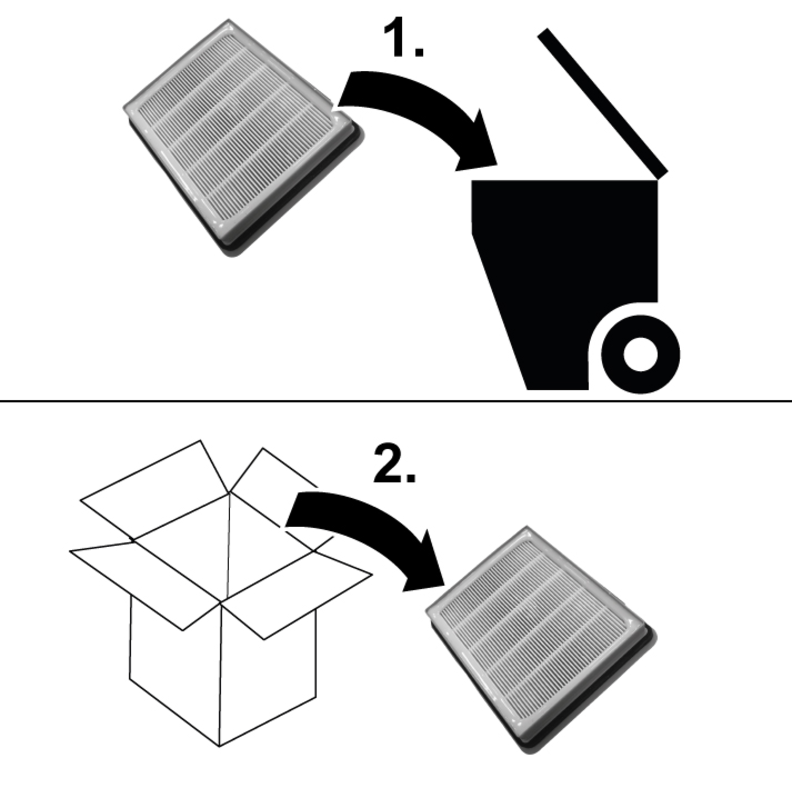
Dispose of the used HEPA filter and remove the new filter from the packaging.
Insert a new HEPA filter into the device, making sure it is firmly seated.
Position the HEPA filter cover at the bottom and fold it upwards until you hear it engage.
The following must be observed when changing the battery.
Correct polarity: The new batteries must be inserted correctly (+ and - terminals must match the markings in the battery compartment). Incorrect insertion can damage the device.
Damaged batteries: Do not use damaged or leaking batteries. Leaking acid can damage the device and cause skin irritation.
Disposal: Never dispose of old batteries with household rubbish, but take them to a collection point for batteries or a recycling centre.
Switchable floor nozzle for carpets and hard floors with LED lights
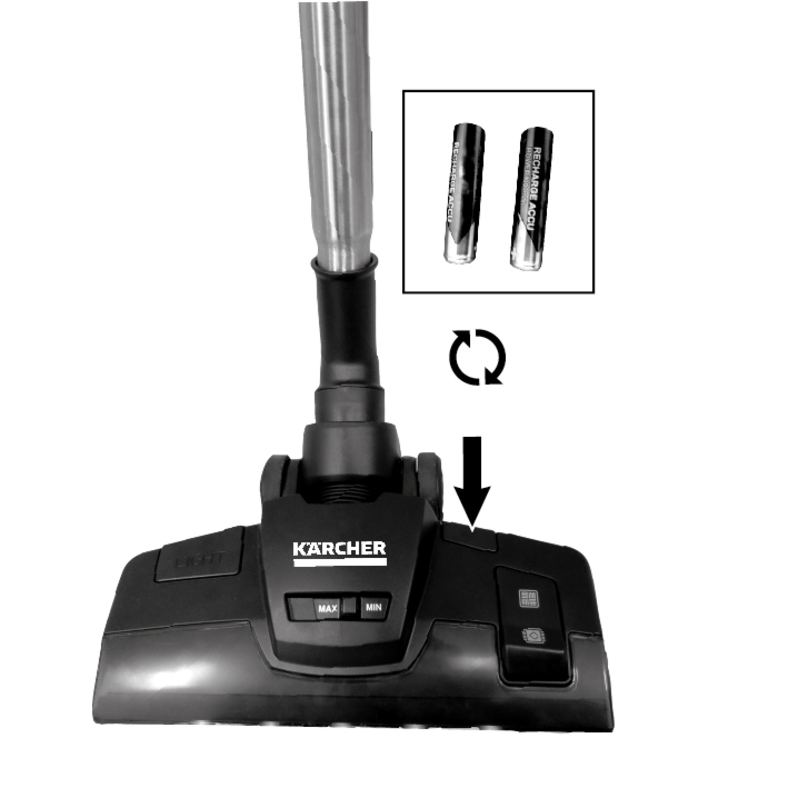
Remove the cover for the battery compartment.
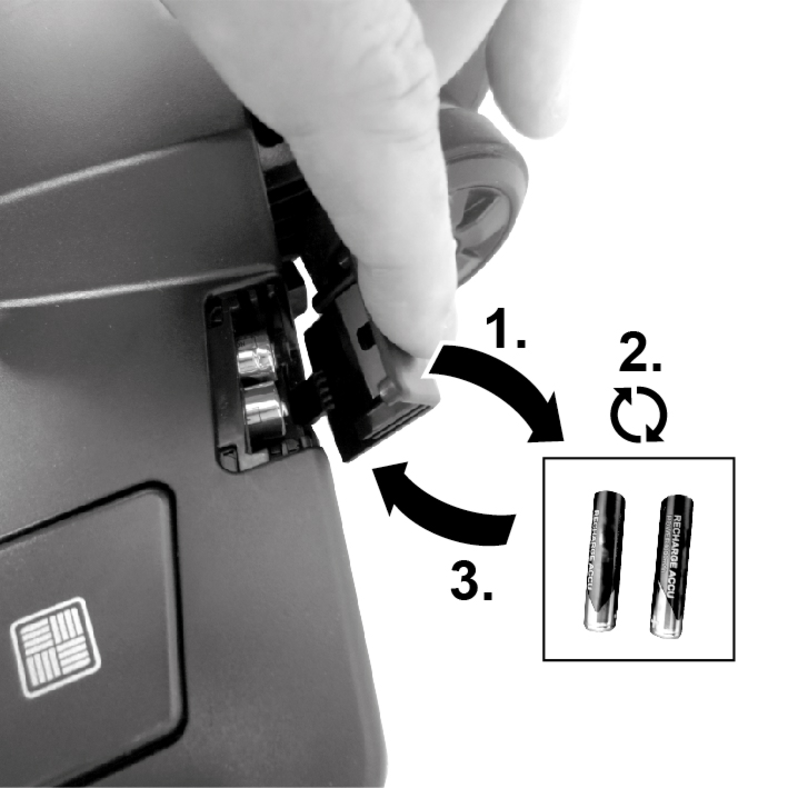
Remove the batteries and replace them with new ones.
Fit the battery compartment and snap it into place. Ensure a tight fit.
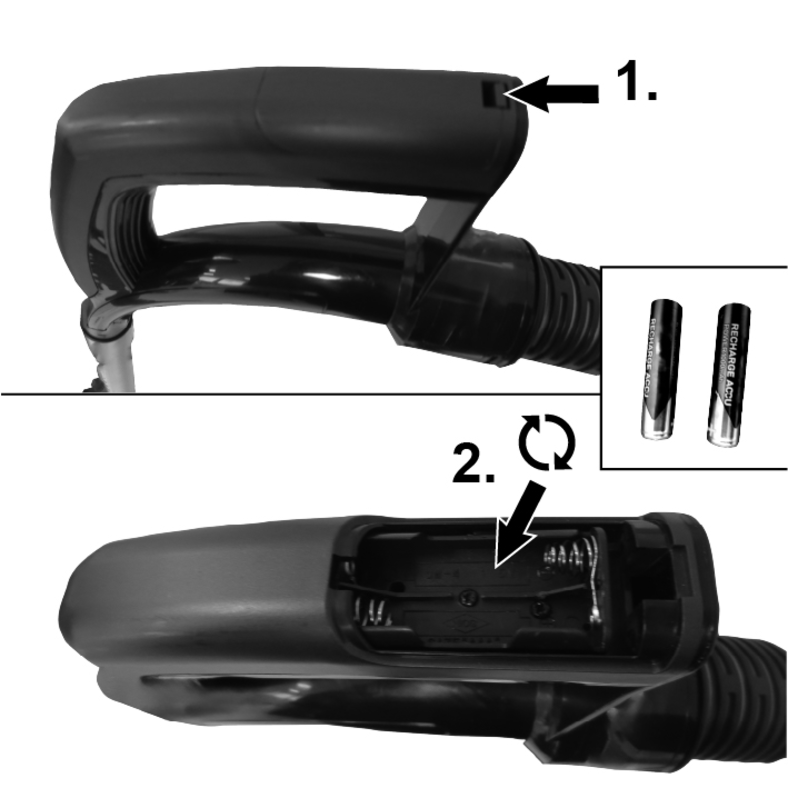
Handle with suction power adjustment
Remove the cover for the battery compartment.
Remove the batteries and replace them with new ones.
Fit the battery compartment and snap it into place. Ensure a tight fit.
Malfunctions often have simple causes that you can remedy yourself using the following overview. When in doubt, or in the case of malfunctions not mentioned here, please contact your authorised Customer Service.
The device does not start up
Cause:
The mains cable is not connected to the socket or the device is not switched on.
Remedy:
Connect the mains cable to the socket or switch on the device.
Cause:
The socket is defective.
Remedy:
Connect the mains cable to a working socket.
Cause:
The power cable is damaged / defective.
Remedy:
Have the mains cable replaced by KÄRCHER customer service.
Poor suction performance
Cause:
The dust container is full.
Remedy:
Empty the dust container.
Cause:
The accessories, telescopic suction pipe or suction hose is blocked.
Remedy:
Remove the blockage.
Cause:
The motor protection filter is dirty / worn.
Remedy:
Clean/replace the motor protection filter.
Cause:
The HEPA filter is dirty / worn.
Remedy:
Replace the HEPA filter with a new filter.
Abnormal engine noise
Cause:
The accessories, the suction opening on the dust container or the telescopic pipe is clogged.
Remedy:
Remove the clog with a suitable aid.
The symbol for the motor protection filter lights up red in the display
Cause:
The motor protection filter is dirty or has reached the end of its service life.
Remedy:
Clean or replace the motor protection filter.
The symbol for the HEPA filter lights up red in the display
Cause:
The HEPA filter is dirty or has reached the end of its service life.
Remedy:
Replace the HEPA filter with a new filter.
Electrical connection | |
Rated power input | 800 W |
Nominal voltage of charger | 220 - 240 V |
Frequency | 50-60 Hz |
Protection class | II  |
Device performance data | |
Tank content | 1,5 l |
Dimensions and weights | |
Weight (without accessories) | 5,22 kg |
Length x width x height | 460x315x290 mm |